Monday, August 2, 2010

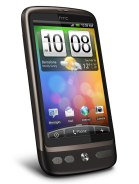
Some thoughts on the official Froyo update for the HTC Desire


HTC released the much anticipated official Android 2.2 (a.k.a. Froyo) for the HTC Desire over the weekend. I was already quite satisfied with Android 2.1 (a.k.a. Eclair) on my device but Froyo seems to have really taken it to the next level. There are a number of new features but I'll just highlight a couple of main ones here.

1. Overall speed is slightly improved. It's noticeable but not a huge difference since it was plenty fast before.

2. Probably the most touted feature of Froyo is Flash support. The native browser can now utilize Flash Player 10.1 to take advantage of numerous Flash content on the web. HTC had initially built-in limited Flash support in their original Eclair ROM for the Desire. It works but performance was quite poor. Flash videos would play but framerates were just horrible. Now, with Froyo and Flash 10.1, Flash videos load quick and play surprisingly smooth. I was able to watch videos from ESPN.com. Youtube videos would load right within the browser (ie, I wasn't kicked out to the streaming video player or the Youtube app). I was even able to play the browser version of Plants vs Zombies! It's a bit slow in that scenario, but it's a miracle that it works in the first place! Kudos to Google, Adobe, and HTC here. Very well done...

3. I'm pretty sure tethering was possible in Eclair. But now, it's idiot-proof. You just toggle the WiFi Hotspot on, set your device's SSID and encryption password, and that's all! Are you listening, Steve Jobs?

4. Installing applications to external memory should have been a feature that was suppose to be there since the beginning. But, better late than never.

5. Chrome to Phone is something that was new to me. I tried it out and it's just brilliant! With just one click in your desktop browser, you can send snippets of information to your Froyo enabled device! (ie, hyperlinks, phone numbers, text you want to copy to the clipboard, Youtube videos, Maps coordinates). This feature really can't be explained. It must be experienced. See here http://code.google.com/p/chrometophone/

6. 720p video recording was rumored to be a feature of the HTC Desire prior to release. Now, we finally get it. I must admit, it's not very impressive. Framerates are quite poor and there's a lot of noise. If you intend to view the video on your device, you should just record in WVGA resolution. If you intend to view it on a larger screen, by all means try 720p but manage your expectations.

Thursday, July 15, 2010

Photography is an expensive hobby!

I'm scared. I've just spent a bunch of money on photography equipment. I'm not an enthusiast and I don't ever want to be. I just want nice pictures =)

There are people who spend tens of thousands of dollars on camera equipment. I'm not one of them. Again, I just want nice pictures.

Like most people, I started off with compact digital cameras. I probably went through about 4 of them over several years, each of them having a higher megapixel count than the previous one. But as the megapixels increased, I didn't noticed much quality increase. That's when I decided to take the jump to Digital SLR cameras.


I'm no photographer and I don't pretend to be. I just want a camera body that's no-nonsense and easy to use. So I went with the Nikon D60. The kit version came with an 18-55mm lens which is just perfect for an amateur like myself. (HK$4200)

Finally, I'm able to get shots that have excellent color clarity and are not ruined by noise. But my camera is like the Dark Side of the Force or the One Ring of Sauron. It keeps leaving me wanting more!

I quickly outgrew the 18-55mm lens and want something with more zoom. I found the built-in flash to be completely useless because it always produces pictures that are over-exposed.

So, I recently picked up some stuff:

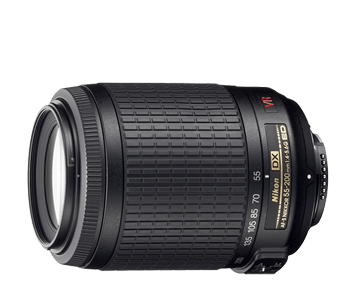
The AF-S DX VR Zoom-Nikkor 55-200mm f/4-5.6G IF-ED
Relatively inexpensive, just HK$1750. It's compact and lightweight (which is critical for me). Comes with a hood (which I honestly had no idea what it was for at the time!) Photos look good with no visible distortions. Even when zoomed all the way in, I'm still able to get sharp pics thanks to the built-in Vibration Reduction. Because it's so lightweight and exterior is made of plastic, it feels cheap in hand. But it costs a fraction of the price of higher-end stuff.

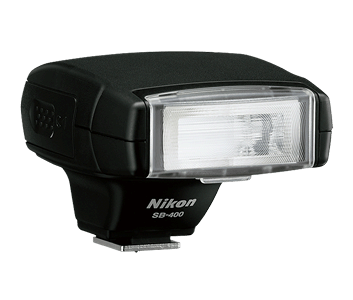
Nikon SB-400
Small and compact (seriously, this is critical for me!). Cost HK$950. The flash unit swivels up so you can bounce the flash. Unfortunately it doesn't swivel laterally.

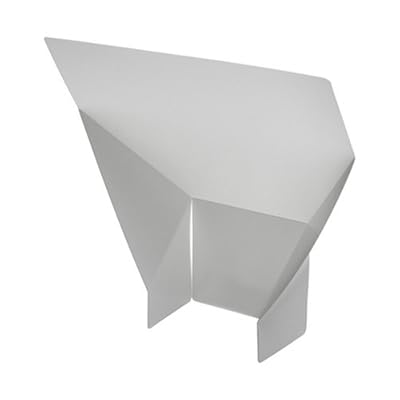
I was trying out the flash at home and it's amazing. Photos using bounce flash just looks more natural and alive. But then I realized, I can't always depend on having a white ceiling. So I need a bounce card. I know I can make one out of paper, but it's ghetto.

So, I went ahead and bought one of these for HK$20.
Now, with all this new stuff, I'm going to need to get a new bag. Seriously, somebody needs to stop me before I spend all my savings just for the sake of nice pictures.

I need Gollum to chew off that Ring.

I need my wife to say the following lines to me:
Her: I don't believe what I'm hearing! Obi-Wan was right... you've changed! You have turned to the dark side!
Me: I don't want to hear any more about Obi-Wan. The Jedi turned against me. Don't you turn against me!
Her: You're breaking my heart! You're going down a path I cannot follow!
Me: Because of Obi-Wan?
Her: Because of what you've done... what you plan to do! Stop! Stop now... come back... I love you!

Then, I'll Force Choke her before Obi-wan Kenobi sets me straight with a swift lightsaber swing to my left arm and both legs as I leap over him to get to more camera gear...

Wednesday, July 7, 2010

McDonald's Fries with Seaweed Seasoning?


So, I'm sitting at McDonald's and decided to slowly kill myself by having my side of fries. I noticed the little pack of seaweed seasoning that you're suppose to add to the fries. Checking the ingredients on the little package, I decided that the fries didn't need the additional help in slowly killing me.

Here are the ingredients of the seaweed seasoning.

Maltodextrin - Food additive; made from corn starch; often found in sodas and candy.
Dextrose Powder - This is just glucose; probably part of the maltodextrin.
Salt - Self explanatory.
Seaweed powder - Probably aonori.
Sea Lettuce Powder - Not sure how this is different to seaweed powder.
Lobster Powder - I was almost sure this was going to be a shady ingrediant. But apparently, it's actually made from lobster and is quite natural.
Sugar - Self explanatory.
Soy Sauce Powder - more salt and maltodextrin but this time with soybean.
Flavouring - Right...
Anti-caking agent E551 - Yum...
Flavour Enhancer E635 - Is this really necessary with all those aromatic powders already?
Vegetable Oil - Of course.
Spices - Right...

Mix this with the ingredients of McDonald's fries and you see what a mess it is.

Potatoes - Certainly...
vegetable oil (canola oil, hydrogenated soybean oil, natural beef flavor [wheat and milk derivatives], citric acid [preservative]) - Wonder what they use for "natural beef flavor"...
Dextrose - We've seen this before...
Sodium acid pyrophosphate - Keeps potatos from darkening.
Salt - More of this?
Prepared in vegetable oil ((may contain one of the following: Canola oil, corn oil, soybean oil, hydrogenated soybean oil with TBHQ and citric acid added to preserve freshness), dimethylpolysiloxane added as an antifoaming agent) - Again, more yummy goodness..

Wednesday, June 30, 2010

My Mobile History...

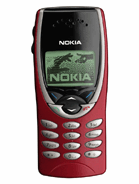
Nokia 8110
These first couple of phones were not mine by choice. I was too young at the time. My phones were basically old models that my parents no longer wanted. I remember the Nokia 8110 as the phone that was used in the movie, The Matrix. Unfortunately, unlike the movie version, the slider is not spring-assisted. Damn thing was huge. I remember a huge problem with it was that it had no vibration mode and the ringer was really soft. Missed all my calls.

Ericsson 768
Finally, a phone that was pocketable. I don't recall much about this one, except that this also didn't have vibration mode. But I bought a 3rd party addon that added this functionality. It was a thin black thing that attached to the bottom of the device via the charging ports. There were magnets inside it which vibrated everytime there was a call. Pretty ghetto solution.

Nokia 8210
This was a phone that my parents literally picked up from the streets. Someone had left it on a bus. Even more petit than the Ericsson 768 and it finally had native vibration! I remember I tinkered a lot with the ringtone editor. Ironically, I lost this phone on the tram heading to the Peak in Hong Kong.

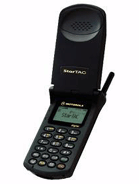
Motorola StarTAC
This will be the last phone that my parents choose for me. I just moved back to the US for university. And this was one of the most advanced phones in the US at the time. Mobile tech in the US at the time was just crap. Anyway, it was good enough. But this had to be the most boring phone I ever had.

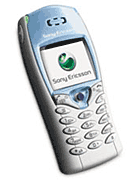
Sony Ericsson T68i
I remember I bought this phone because it was one of the first with a color screen (albeit 256 colors). Also, I liked it because the formfactor resembled the Nokia 8210 which I was quite fond of. This phone was also one of the 1st to support a camera. But the camera wasn't built in. It was an add-on to be purchased seperately and attaches to the bottom of the device. Similar to that vibration add-on for the Ericsson 768 and equally as ghetto. The joystick soon started to malfunction after about a year and a half of use.

Sony Ericsson T630
With the joystick failing on me, I sprung for the T630. It was an obvious upgrade path for me. Larger screen with 65k colors and built in camera! The camera quality and screen resolution were pretty pathetic. I had no idea why I thought the camera was cool. Again, joystick was the first hardware to start failing on me. I was beginning to see a trend...

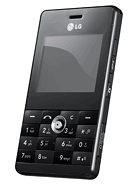
LG KE820
My T630 was purchased over in the US and didn't work with HK networks. So I was forced to get another phone when I moved back to HK. Besides, the joystick was shot. I decided that I just wanted a phone as small as possible. With the KE820's 9.9mm width and the relatively large screen, I was sold. I remembered that I thought to myself at the time "Wow, the screen is so huge. I should be able to enjoy videos on this thing!" So, I converted and loaded a couple of DVD's onto the thing. Unfortunately, the video player lacks a full screen mode. The video filled only about 75% of the screen. The number pad layout was also an issue. And then there's the friggen joystick which was again, the first hardware to start failing. Never was I going to get another device with a joystick.
But it wasn't the joystick that killed the phone. One rainy morning, I was running to the bus stop to catch my ride. Somehow, the phone slipped from my pocket, landed on the concrete, and I didn't even know about it. It just layed there for a while in the rain before someone picked it up and used the phone's contact list to reach me. I picked it back up from the kind individual, but by then, most of the buttons were dead.

HTC Touch Dual
HTC, an unknown brand at the time, started to market their Touch phone. I thought to myself that it would be nice if it had a keypad. Then the Touch Dual released and I couldn't wait to pick it up. At the time, I was sold on the large screen and formfactor. I had high expectations for Windows Mobile because I figured it must be pretty advanced compared to the last time I used the OS which was back in 2001 with the Compaq iPaq. Boy was I wrong. The OS is still the same and the device was pretty unstable. (See my review)

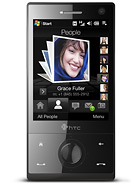
HTC Touch Diamond
I remember not liking Windows Mobile very much. But I loved what HTC did with the OS with TouchFlo3D. The Touch Diamond's release was pretty spectacular. I was almost drooling at the TouchFlo3D animations and the VGA display. (See my review)

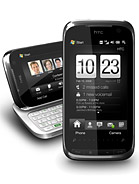
HTC Touch Pro2
I was ready to jump ship from Windows Mobile, but Android was just not ready for primetime yet. And I really don't like the iPhone OS. At the time, the Touch Pro2 was my most satisfied phone purchase. Best hardware keyboard, huge screen, and snappy performance. It was still Windows Mobile, so there will be the occasional freeze but they were very rare. (See my review)

HTC Desire
The HTC Desire had all but one of the specs that I wanted in my next device. Internal storage of at least 4GB. But with the falling prices of microSD cards, it's something that I can overlook. The Desire has surpassed the Touch Pro2 as my most satisfied phone purchase. (See my review)

Tuesday, June 8, 2010

Retina Display? Really, Apple?


This "feature" of the upcoming iPhone4 is way overrated. All that was done was they doubled the horizontal and vertical pixel count of the previous iPhone. This resulted in a display that has 4x the resolution of the previous iPhone. That is, 960x640.

While this is impressive, it's not as magical as Apple makes it sounds. Most smartphones for the past couple of years have had WVGA screens (800x480). You'd be hard-pressed to find someone with eyesight good enough to perceive individual pixels on WVGA displays.

The increase in display resolution was not a surprising move by Apple. The previous resolution was quite pitiful. But only Apple can come up with a term such as "Retina display" as if it's some sort of new tech.

It's not! All they did was improved the screen resolution while maintaining the same 3.5inch screen size! The sad thing is that people will believe in this "Retina display" technology. When they go into a store and ask a sales about a non-Apple product, they'll say "Does this have a Retina display?"

OMFG...

Edit: This is in regards to the 1st commenter. I understand why they're calling it the "Retina display" but I don't understand why they have to call it anything at all. It's not new tech. It's not like we've gotten to the point where we just couldn't increase pixel density any further. Other than price and practicality, there was nothing to stop people from creating a display with 300+ dpi pixel density. Back in 2007, the Toshiba Protege G900 was released with a pixel density of 313dpi.
Conclusion: I praise Apple for releasing a commercial device with 326dpi pixel density. But I despise them for flaunting it as if it's something new that they invented.

(Are we going to have to come up with a new term everytime someone increases the pixel density beyond 326 going forward?)

Wednesday, May 5, 2010

Convince me I need an iPad


Apple announced it sold it's 1 millionth iPad in just it's 1st month. I don't get it. How are these things selling like hotcakes? I can't come up with a reason to get one of these things. Even if one was given to me as a gift, I don't see myself using it very often.

Steve Jobs mentioned he wants to position the iPad to fill the niche between laptop and smartphone. First of all, I had never felt that there was a gap between these 2 devices that needed filling!

I have a Macbook and an HTC Desire. (I also have a desktop PC, a TV, DVD player, etc but let's focus on these 2 because of what Steve Jobs said.) The Macbook is strictly for web browsing, managing my photo collection and managing my music collection. I also bring it with me when I travel for watching movies. The HTC Desire is my smartphone which I carry everywhere. Where does the iPad fit in here?

I can use it to browse the web, but so can my Macbook (and Desire for that matter!). The desktop browser allows me to do so much more on my Macbook than I could on an iPad. For example, load multiple Youtube videos across multiple tabs, play Flash-based games, attach all sorts of files to emails, etc.

I can't use it to manage my photo collection because there's no USB port to import files and can't connect to printer. (Edit: I just noticed that Apple makes an accessory called the "Apple iPad Camera Connection Kit". Well, maybe I can use it to manage my photo collection after all. But this "feature" really should not require additional cost in the form of an add-on.)

I can't use it to manage my music collection because of the following:
-Can't get music onto the iPad. No USB port, browser can't download files, no optical drive for importing.
-Can't get music from the iPad. No USB port, no optical drive for burning media.

I guess it might be a better alternative than the Macbook for vacations. But then I only travel maybe 2 or 3 times a year. It's just not worth it.

I would love for someone to be able to convince me to get an iPad. Because I want to play with one. The large multi-touch screen looks fun. But, so far, I can only come up with one remotely valid reason to get it and many many reasons why not to get it.

1. The iPad is a portable device, not a mobile device. It's not like your smartphone which you take everywhere while not even thinking about it. You can't just put the iPad in your pocket. You're going to need a backpack or briefcase. If you're going to take it out of the house, you need to think about it and dress/accessorize accordingly.

2. The iPad is a portable device, not a mobile device, but yet, it runs a mobile OS. So why not just use a mobile device that runs a mobile OS? That is, either the iPhone or iPod Touch.

3. Because of the above, it seems to me that the iPad is best to be left and used at home. But if I'm at home, why don't I use my main computer? Why not use my TV? Why not use my stereo?

4. According to Apple, the iPad offers the best web browsing experience. Really? It doesn't support Flash. There's no file system so you can't download or upload anything. No, the iPad does not offer the best web browsing experience. It has a multi-touch mobile browser on a large screen. That's it.

5. According to Apple, the iPad offers the best email experience. Really? Again, there's no file system so you can't download or upload attachments (except for pictures). My smartphone offers more functionality here.

6. The most attractive feature of the iPad is, of course, the screen. A typical laptop has a larger screen. And since it's a real computer, you can do loads more things with it.

I haven't even started mentioning the other limitations of the iPhone OS!

This leads me to believe that Apple could have released anything and it would have sold a million units in 1 month. Just ask people about the upcoming iPhone. Even before the recently leaked footage, people all say they can't wait for it and they'll get it, no questions asked. What the hell? Only Apple fans think this way. There is no information released about a product and yet, they know they want it.
Before a person decides he/she wants to buy something, shouldn't he/she know what that thing is first?

Monday, May 3, 2010

Tips & Tricks for the HTC Desire


Long-pressing the Stand-by key brings up options to:
- Power off (obviously)
- Toggle Silent mode
- Toggle Vibration mode
- Toggle Airplane mode
- Toggle Mobile network
The last 4 items are particularly handy since that means you don't need dedicated widgets on your homescreen for them.

Pressing the Volume Down key after the ring volume is 0% will toggle on Silent mode and then Vibration mode. Similarly, pressing Volume Up key will toggle it back the other way.

Android does multi-tasking extremely well. Long-press the Home key to toggle between the most recent 6 applications you've been using.
Edit: After the official Froyo update, the most recent 8 applications are now available.
Edit2: If you have an Desire HD/Z ROM port, then the recent application list is also accessible in the notification shade.

To quickly move widgets across screens.
1. Tap and hold a widget.
2. With another finger, swipe across the optical pad to the screen you want to land on.
3. Release the widget.
The Home key also functions when you're holding a widget. So if you want to move a widget from the far left to the center screen, you just have to tap and hold, press Home, and then release the widget.

Speed up your browser
I've been doing this since Opera Mobile on my Touch Diamond and I'm pleasantly surprised I can still do this on Android's browser. The browser on the Desire is actually already quite fast. But try disabling Javascript. Many sites work just fine with this disabled and you'll definitely feel the difference in loading speeds.

In the browser, if you want to get to your History list, long-press on the Back key.

In the browser history, you can easily and quickly add/remove bookmarks by toggling the stars on the right.

Select and delete multiple messages at once in Mail application
This may already be well-known but it took me a while to figure it out so I'll include it here.
1. Press the Menu key.
2. Tap Delete.
3. Select the messages by tapping on the "X" on the right of each message.
4. Tap Delete.
Edit: If you run a Desire HD/Z ROM port, then your Mail application will have checkmarks always visible on the left.

Moving messages into folders in Mail application
1. Press the Menu key
2. Tap "More"
3. Tap "Move to"
4. Select messages by toggling the checkmark on the right of each message.
5. Tap "Move to (x)"
6. Select accordingly

In Mail or Messages application, tapping on the contact picture brings up several icons for you to do one of the following:
- Call the contact
- View the person's contact card
- Send SMS
- Send email
- Send IM via Google Talk

Synchronize with Google Exchange server as an alternative to the Google Mail application which is quite limited. Set up with the instructions here.
Edit: Ever since Google started releasing updates to their Google applications, the Google Mail application has actually become quite robust.

In the dialer, tapping the contact card icon on the right of each item will take you to the respective contact card. Tapping the plus icon allows you to add that number to your contact list.

In the dialer, if you don't input any numbers and you don't select anybody on the list and you just tap "Call", it will call the person on the top of the dialer list.

In the dialer, scrolling (either swiping the list or using the optical trackpad) will hide the number pad.

In the dialer, swiping laterally on the optical pad will toggle between different phone numbers of the selected contact.

Calculator can be rotated into landscape via accelerometer to transform into a scientific calculator.

As an alternative to the downward swiping gesture to unlock, press Menu key. Edit: This is no longer applicable after the official Froyo update.

To unlock the device, you don't actually have to swipe downwards on the bar near the bottom of the screen. You can begin your downward swipe anywhere and then let go once you make contact with the bar.

To see the current date, just tap on the notification bar and it will be displayed in the upper-left corner of the screen.

In camera application, tap and hold on a spot to focus there and take the picture.

The word suggestion bar (that appears during text editing) can be moved by tapping, holding and dragging it.

Press the Back key to hide the on-screen keyboard.

To select custom sound files for notifications, put them in the following folders in the root of the microSD
Ringtones
Alarms
Notifications

To jump to a particular letter in the Contacts list, you need to use the scroll bar. The scroll bar appears on the right when you scroll but will auto-hide after 2 seconds. To easily grab it, touch and the contacts list, scroll it (don't flick-scroll), stop, and let go. The scroll bar should now be stationary for you to just get it.
Alternatively, try scrolling vertically with two fingers on the screen.

Use the Search key. It's not just for searching Google.
-If you type a contact's name, you can easily access the contact card.
-If you type an application's name, you can easily launch it.
-If you press the Search key while you're in your browser bookmarks, you can search within there.
-many more uses!

Use the Menu key. Try it everywhere. You may find some helpful settings/options/features.

Press the following into your dialer to access some interesting stats:
*#*#4636#*#*

Go easy on widgets. HTC Sense has some really nice widgets but some of them adversely affects your battery life because of their need to be updated throughout the day. I'm not suggesting you don't use any of these. But try to take a conservative approach for better battery life.
-Twitter. Don't use the full screen Twitter widget. It only allows you to view tweets and post tweets. You can't interact with the tweets in other ways and you can't hit links. If you tap a tweet, you're just taken to the full Twitter application. Solution: Just have a shortcut to Peep on your homescreen. If you must tweet from your homescreen, use the 2x4 Twitter widget.
-Friendstream. See above regarding Twitter. Same thing.
-Latitude. Why anyone would use this is beyond me. This just keeps updating your current location. It'll wreak havok on your battery, especially if you have GPS enabled.
-News. Just have a shortcut to News application. The Widget almost doesn't make sense if you have more than several RSS feeds.
-Stocks. Again, you can just have a shortcut to the Stocks application.
-Weather. Remember, none of the weather widgets are necessary if you already use the HTC clock+weather widget. You can just tap the weather icon in that widget to launch the Weather application.

Use the optical track-pad. Lots of review sites mention that it's useless and that they'd prefer HTC to just not include it so that they can either have a larger screen size or smaller device. I find it to be very useful.
-Use it for precise cursor placement in text editing. Great for going back to correct a block of text.
-Use it for selecting text in text editing. Place the cursor where you want to start your selection. Long-press on the optical track-pad to bring up the context menu. Tap "Select text". Then use the optical track-pad to fine tune your selection. Afterwards, you can long-press on the optical track-pad to bring up the context menu to cut or copy the selection.
-Use it in the browser to jump between links. This is useful if the links are very small. You can also long-press on the optical track-pad to bring up the context menu so that you may open in new window, etc.

If you don't want the default Photo or Music application to pick up media files in a particular folder, just add a blank text file name ".nomedia" in that folder.

Install Voice Search and Voice-to-Text. For whatever reason, HTC decided to leave these 2 amazing features out.
1. You'll need a file explorer application from the Android Market. Astro works for me.
2. Download and install Voice Search.
3. Download and install the HTC_IME mod.
4. Go to Settings > Language and keyboard
5. Toggle on "HTC_IME mod"
6. Long-tap on a text entry box.
7. Select "Input method" from the popup
8. Select "HTC_IME mod"
Edit: This is no longer applicable. The official Froyo update includes Voice-to-Text and Google has since made Voice Search available on the Android Market.

Music controls on the lock screen autohide after a few seconds. Swipe up to bring them back.

To get your Google Reader feeds on to the HTC News application:
1. Export your Google Reader subscriptions as OPML file.
2. Save this file onto your device. (If necessary, rename the file extension from xml to opml.)
3. Import this file into your News application.

If you are locked up in a loop where HTC Sense acts up and starts to force close, use the search key and type the first few letters for "Applications". You should be able to access the Applications settings menu. Go into "Manage applications". Go into "HTC Sense" and tap "Clear data". This will erase all your Scenes but it's better than doing a hard reset.

Fastest way to soft reset is to press Power/Standby key + Volume Down key + trackpad. Not recommended if your device is still responsive.

When composing an email using the Mail application and you have multiple email accounts configured, you can select which account to send from. This applies even if you are replying to an email. For example, if someone sends an email to your Gmail account, you can reply to it with your Hotmail account.
In the email composing screen, scroll all the way to the top. Above the "To" field, there's a button that indicates which account the email will be sent from. Tap that button to pop-up a menu that lets you select an alternate account.

If you are listening to music via the default music player, pulling out the headphones will stop the music playback. So you don't have to stop the music before pulling out the headphones.

Chrome-to-Phone. Anyone who has used it will agree this is a killer feature of Android. See here for installation. It connects your desktop Chrome browser with your Android. Allows you to send several different items to your Android.
Text: Select any text in the browser and click the Chrome-to-Phone button to copy the text onto your Android's clipboard. I use this all the time if I want to type out a long SMS on my desktop. I just go to Google.com and type it in the search box. Then I select the text and hit the Chrome-to-Phone button. Then all I do on my Android is to paste the text onto the Messaging application.
URL: Go to any site and click the Chrome-to-Phone button to send the site url to your Android. Depending on your settings, the site will automatically start loading on your Android browser or you'll receive a notification which will open the site if you click it.
Phone number: If you select a phone number in the browser and click the Chrome-to-Phone button, the number will appear in your dialer.
Map: If you've navigated to a location on Google Maps, clicking the Chrome-to-Phone button will open up your Android Maps application and navigate to the same location.
Youtube: If you're on a Youtube video page, clicking the Chrome-to-Phone button will open your Android's Youtube application and load the same video.
In the browser, enable "Open in background". This allows you to stay on the current page as you open links in new windows. You'll be able to browse much faster this way. For example, let's say you want to open 4 links from the site you're visiting. Just open up the first 3 links in a new window and the 4th link in the current window. While it's loading, switch to the next window to view the 1st link which should have loaded by now. Then you can continue on to the next windows without waiting since they would have loaded by the time you finished with the first window!